-

Research
GO Technology: AI and the Algorithm: How tech is shaping venue discovery

With festive bookings flying in, if you’ve not done it already, NOW is the time to prepare. Set up your plans today so your system takes care of the prep when your guests arrive.
The Christmas period is one of the busiest and most exciting times of the year across the hospitality industry. But as every operator knows, no two days run the same – and this is especially true during December. Demand can vary dramatically from day to day, so having a flexible setup that adapts to festive peaks and lulls is essential for maintaining great service and maximising revenue.
With the insights available through your system, you can begin to spot seasonal patterns and guest behaviour trends. For instance, your site may see quieter services early in the week, with Thursdays and Fridays ramping up into the weekend, Saturday peaking during dinner, and Sunday drawing strong lunchtime crowds.
Understanding these patterns helps you prepare for Christmas trading too. Perhaps on Fridays, tables of two turn faster than larger groups – or on Christmas Eve, you expect longer dining times for families. By adjusting your table configuration and timings accordingly, you can improve your flow, elevate guest experience, and boost yield across your busiest festive days.
Below, we’ll guide you through how to make the most of your layouts, plans, and turn times – and how to tailor your Zonal Events and Table systems to shine throughout the holiday season.
Table Plans
A “Plan” combines two essential elements:
· Table Layout – your table numbers and seating configuration.
· Turn Times – how long you allow each booking per party size.
Both can be managed under Manage Sites in the Events Admin section.
Once set up, a plan can be applied to your scheduling – for both Standard Days and Special Days. This flexibility lets you adjust for high-demand festive periods like Christmas Eve, Boxing Day, or New Year’s Eve.
If your site uses sessions (e.g. Breakfast, Lunch, Dinner), you can also apply plans per session to better reflect seasonal trading patterns.
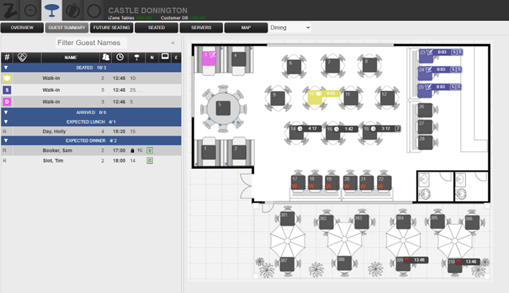
Table Layouts
During December, bookings often look very different from the rest of the year – larger groups, family gatherings, office Christmas parties, and festive menus all bring new dynamics to your floor.
Now’s the time to rethink your layout:
· Add or combine tables to accommodate larger party sizes.
· Reconfigure quieter corners for group bookings.
· Ensure service flow remains smooth even with more guests on-site.
By tailoring your table layout for Christmas, you’ll ensure every space in your venue works hard for you while maintaining a festive and welcoming atmosphere.
Turn Times
Turn Times play a vital role in managing flow during busy festive periods. With guests celebrating, dining times often extend – but smaller tables or quicker lunches might still need a faster turnaround.
Your system uses a hierarchy to determine which Turn Time applies:
1. Occasion (defined in the Occasion setup)
2. Area (set within the Turn Times tab – templates can be area-specific)
3. Session (defined for standard or special days)
4. Default (if no others apply, typically 2 hours)
Example Scenarios:
· Christmas Occasion: You’d like guests booked under your “Christmas Occasion” to have 2.5 hours at the table, while standard bookings retain 2 hours. Set this in the Occasion Turn Time – it will take priority.
· Festive Sports Area: You have a section showing live festive football matches. Set a unique Turn Time in that area to allow guests to enjoy the full game without overlap – this can be done under Sessions.
Special Days
Key festive dates often require bespoke setup – Christmas Eve, Christmas Day, Boxing Day, New Year’s Eve, and even that quieter week between Christmas and New Year.
Creating Special Days allows you to tailor your service for these dates without changing your standard configuration. For example, your site may:
· Open only for Christmas Day Lunch
· Extend hours for New Year’s Eve Dinner
· Close entirely for a few post-festive rest days
To create a Plan to apply to a standard day or special day, follow these steps:
Navigate to Events Admin → Manage Sites → Plans

1. Click Add new table plan
2. Enter a Name for the plan
3. Select from the drop downs the desired Turn Times and/ or Table Layout
4. Click Save Changes
Applying a Plan to a Standard Day
Follow these steps to apply plans to standard days:
1. Go to the Manage Capacity tab
2. Select the Standard tab
3. Locate the day of the week you want to amend the plan for. Click the arrow beside the day name and the sessions will appear

4. Select from the drop down, in the Table Plan column, the desired plan name
There is no save option. Once a selection is made this will take effect for all future days/ sessions (unless a special day is configured and this will take precedent).
Applying a Plan to a Special Day
Follow these steps to apply plans to special days:
1. Go to the Manage Capacity tab.
2. Select the Special tab
3. Locate the Special Day you wish to action. Click Edit
4. In the header row, using the drop down, select the required Plan name

5. Click Save Changes
A plan can also be changes within the Tables Host app screen within Future Seating
Need a Helping Hand?
The festive period is all about preparation and precision, and we’re here to help you get the most from your system.
If you’d like further guidance or would like to discuss the best ways to optimise your setup for Christmas and New Year, please reach out to your Account Representative who will get you in touch with our Customer Success Team.
Together, we’ll make sure your venue is perfectly planned, fully festive, and ready to welcome guests all season long.

Head of Customer Success at Zonal at Zonal
Natalie is the Head of Customer Success at Zonal. Having worked in the hospitality sector for 17 years, in roles ranging from front of house, business development, event co-ordination and leading a project team, it brings an understanding of how various teams operate. Specialising in Bookings, Natalie is passionate at ensuring users get the most out their systems and ultimately driving operational efficiency as well as bottom line. In her spare time, Natalie is on the management committee of a Community Owned Pub in North Wales, which brings with it a wealth of knowledge in experiencing the day to day issues and challenges faced within a business.
Research
GO Technology: AI and the Algorithm: How tech is shaping venue discovery
Research
GO Technology: Game On – How Hospitality Can Win at the World Cup
Research
GO Technology: People vs Tech in 2026
Research
GO Technology: Consumers and hospitality: What 2025 habits reveal about the year ahead
Research
GO Technology: The new age of pub service
Research
GO Technology: The social value of hospitality

Research
GO Technology: More Than a Meal

Research
GO Technology: Why 6:12pm is the new 8pm
Research
Pub Accommodation Review 2025

Hospitality plays a central role in consumers’ social lives, as well as in their local communities – providing valuable employment opportunities, vibrancy, and a vital space to socialise with friends and family.
With hospitality venues making up two thirds of consumers’ favourite local venues, our sector sits at the heart of the high street. But why does hospitality matter so much to consumers? Which venue types are most likely to be a guest’s favourite? How does hospitality engagement differ by age and location? And do consumers think hospitality needs greater support from the Government?
Discover all of this, and more, in this exclusive research produced in partnership with CGA by NIQ and UKHospitality, featuring insights from over 5,000 British hospitality consumers.

Research
GO Technology: AI and the Algorithm: How tech is shaping venue discovery
Research
GO Technology: Game On – How Hospitality Can Win at the World Cup
Research
GO Technology: People vs Tech in 2026
Research
GO Technology: Consumers and hospitality: What 2025 habits reveal about the year ahead
Research
GO Technology: The new age of pub service
Research
GO Technology: The social value of hospitality
Research
GO Technology: More Than a Meal
Research
GO Technology: Why 6:12pm is the new 8pm
The sun is still shining, and for many, summer holidays are still here. We’re not wishing that away, but as operators, it’s important to start looking ahead. The festive season is just around the corner, and for most venues, it’s the busiest time of the year. Preparing now means you’ll be ready to hit the ground running when demand peaks.
Zonal’s Customer Success team are already feeling the festive spirit. We’ve been talking Christmas since June, helping get businesses up to speed with some of the newer features and functions within our Events platform – especially pre-order!

Introducing pre-order menus during this period brings plenty of benefits: streamlined operations, better stock control, and happier guests. With pre-orders, you can forecast demand more accurately, reduce food waste, and ensure the kitchen has everything it needs. It also eases the last-minute rush, giving staff more time to focus on service and creating a smoother, more enjoyable experience for everyone.
Here are some of the top things to consider when introducing new starters to the system, or for those that need a quick refresher.
7 steps for a smooth setup of Pre-order
*This process flow requires you to have the following Zonal solutions: Aztec, iOrder, Events & Tables
1. Setting up your booking rules
By now, Christmas bookings are likely already picking up speed, with customers returning from summer and turning their attention to festive plans. If you haven’t set up your booking rules yet, don’t worry, it’s not too late!
If you’re planning to take deposits, pre-orders, or pre-payments, the first step is enabling the correct booking rules as early as possible. Even if your menus aren’t signed off yet in EPOS/Aztec or iOrder, or if your marketing team is still finalising the copy, you can still set up the rules for bookings being made today. Doing this can help avoid extra manual work later, ensuring a smoother process for both you and your guests.
Once the final details are agreed (and tested), and when your rules are in place, you can then trigger email notifications to your guests that the ability to place their pre-orders is now open.
Here are some example scenarios that may help, along with some simple actions you can do to get yourself ahead, or simply back on track:
Scenario 1:
“I currently have no Booking Rules defined, but I want to be taking pre-orders”
Ok, so you are taking bookings without any rules/requirements. At this stage, you will need to:
Create the new Booking Rule.
Edit each existing booking manually to apply the new rule/requirements.
Any new bookings made after you enable the booking rule will be subject to the conditions automatically.
If you haven’t created your rule, but you do want to add an ad hoc payment to a booking, you can manually add a requirement to that singular booking. You will need to edit the booking and edit the booking requirement.
Scenario 2:
“I have a rule in place for a deposit only, but need to include a pre-order request”
Ok, so you are taking bookings with a rule defined for deposits already. But now you want all of these bookings to also require a pre-order. In this scenario, you will need to:
Edit the Booking Rule.
Add the action of pre-order with the required timeframes.
When editing a rule, you will be asked if you want to trigger notification to existing bookings on that rule. We recommend selecting YES as this helps set expectations.
Guests will see that a pre-order is due but won’t see the menu or be able to order until you open the pre-order for selections.
Scenario 3:
“I have a rule requesting a deposit & pre-order in place. I now want to get them to pre-pay for their items”
This resolution for this is pretty much the same as scenario 2. But what we highlight here is that you must edit the existing booking rule and add the action within.
Booking rules work on a hierarchy. If you try to use two separate booking rules (one for deposits, one for pre-orders), only one will apply.

2. Know your pre-order send setup
Pre-orders require key configurations defining how and when they are sent to the POS. It’s important to know what your setup is as this will help set you and your teams expectations when it comes to what you do on the day. We’ve outlined the below setup that the majority of configurations we see being:
Send Time: 4am – 7am
This is when pre-orders will attempt to send orders to the site POS, starting from 4am on the dining date of the booking. There is a window of a few hours to allow for re-tries and in some instances, high volumes. After 7am on the day, any errors will then be visible to you in the Events Host application, allowing you plenty of time to resolve any issues manually.
Pick Up Time: 23:59
All pre-orders will display on POS with a pickup time of 23:59. This means the order will remain on the POS, unsent, unassigned until 23:59 on that same day.
Delayed Order Send time: X mins before pickup time
Pre-orders will automatically send to the kitchen X minutes before the pickup time set above, unless manual intervention has occurred. If no manual intervention has occurred, the order will be sent to the kitchen without a table number. This is why we recommend this pickup time being set to 23:59 to prevent orders sending directly to the kitchen without Table Numbers.

3. Pre-Arrival Checks
When it comes to the day. After your pre-order sends have taken place, it’s now time to log onto the Events Host platform. We suggest going to the Day Diary tab. This will display all bookings for the day.
Any pre-order sending errors will appear in red – in the example it shows, Error sending PreOrder to EPOS.
To troubleshoot any errors, navigate to the chef reports on the Reports tab. Using the date range selector, amend the start and end date to the current day. All pre-orders will display. In the example shown, using the Event view of the report, you can easily see the reason for a pre-order not sending.
In this example, the error is an item out of stock. To resolve this error, the item will need to be placed back in stock on the POS. Once this is done, select Resend pre-order on the chef report.

4. Kitchen Team Preparations
Once all errors have been resolved, you may want to ensure the kitchen team have a copy of the chef report. This way they can prepare large orders in advance. For this we recommend using the report from the Events Host app. We suggest using the report that states the number of items per event (as shown in the image). The chef report can then be printed from the host application.

5. POS Checks
Once a pre-order reaches the POS, they are stored on the till as delayed orders.
To view the orders, navigate to Pick up Account on the till (often found in Options). This will display all open accounts within the sales area.
Use filtering at the bottom of the screen to display only Delayed Orders. If the venue as multiple sales areas, it is recommended that the Sales Area Account filter is deselected to show all orders across the venue.
Ensure all bookings that have a successful pre-order are displayed. Please note additional orders may display if using delayed ordering for other elements.

6.Front-of-house Preparation
Run Sheets are part of a “Central Reservations” additional feature in Events. If you do not see this option within your setup, you may need to speak to your Account Manager.
This particular feature is really useful for those large bookings. To access the Run Sheet, open the booking on Events Host, scroll towards the bottom and select Generate Run Sheet. Click the desired options, generate and print once loaded.

7. Guest Arrival
Now that you have prepared your morning tasks, it’s time for the guests to arrive. The steps below offer a walkthrough of the recommended steps for handling bookings once guests have arrived at the venue.
Step 1: Seating a booking
Once the booking has arrived and the guests are ready to go to their table, seat the guest on the Tables Host platform.
If the booking has a deposit, the Redeem Deposit box will display. Use the Seat & Redeem button to add the deposit to the table (if the option does not display, please speak to your Account Manager who will be able to enable this feature for you).
Once completed, the table will be opened on the POS with the booking name and deposit.
Step 2: Check the Pre-order with the guests
Once all the guests have arrived and are seated, using the chef report or run sheet, you can confirm all pre-ordered items are correct with your guests.
Step 3: Add the Pre-order to the table on the POS
Log on to the till and navigate to delayed orders (found in Pick Up Account usually in Options, use filtering to display delayed orders only).
1. Select the correct delayed order (pre-order).
2. The order preparation prompt is then displayed asking if you wish to start preparing the order. It is important that you select No so that you can assign the pre-order to a table. If Yes is selected, this will send the pre-order straight to the kitchen without a table number.
3. Selecting No will open the order on to the Order Pad.
4. Add the order to the table where the booking is seated by opening the table plan on POS. In the example shown, the Tables button is selected to open the table plan; this may be worded differently in different estates.
5. A box will display asking Do you want to merge Order Number X with Table X? select All Items to add all pre-order products to the table.
6. Once added to the table, make any required changes from the checks done in step 2 . On completion, click Save and this will send the finalised order to the kitchen.
Head of Customer Success at Zonal at Zonal
Natalie is the Head of Customer Success at Zonal. Having worked in the hospitality sector for 17 years, in roles ranging from front of house, business development, event co-ordination and leading a project team, it brings an understanding of how various teams operate. Specialising in Bookings, Natalie is passionate at ensuring users get the most out their systems and ultimately driving operational efficiency as well as bottom line. In her spare time, Natalie is on the management committee of a Community Owned Pub in North Wales, which brings with it a wealth of knowledge in experiencing the day to day issues and challenges faced within a business.
Research
GO Technology: AI and the Algorithm: How tech is shaping venue discovery
Research
GO Technology: Game On – How Hospitality Can Win at the World Cup
Research
GO Technology: People vs Tech in 2026
Research
GO Technology: Consumers and hospitality: What 2025 habits reveal about the year ahead
Research
GO Technology: The new age of pub service
Research
GO Technology: The social value of hospitality
Research
GO Technology: More Than a Meal
Research
GO Technology: Why 6:12pm is the new 8pm
Research
Pub Accommodation Review 2025
Zonal partner, 125 Data & Insights, is a customer experience dashboard that gathers consumer data and shows operators exactly what their customers love and where they think things can improve, so that they become, and remain, loyal customers and advocates of the business.
Here we chat with Managing Director at 125 Data & Insights, Olivia FitzGerald, about all things loyalty – and how to make a ‘superfan’.
What channels do you think are most effective for engaging customers in today’s market, and why?
There’s no one size fits all solution when it comes to ways of communicating in today’s market. Our data shows that Google is universally important across different demographics, with businesses needing to prioritise their reputation there. In fact, 69% of customers reported checking Google before planning a visit, and 90% of them considered the information found on Google as crucial. This highlights how businesses cannot afford to ignore Google.
Social media channels are also very important, with younger generations more engaged with Instagram and TikTok due to their visual nature. Older generations tend to use review websites such as TripAdvisor instead and, while it may seem outdated, email is still one of the most cost-effective and easy-to-use channels.
How can businesses leverage data to personalise customer interactions and improve engagement across different channels?
The first step to personalisation is understanding your customer demographics. By using certain tools, businesses can segment their database based on customer preferences and behaviour. For example, older demographics tend to have higher brand loyalty, while younger generations may frequent a wider range of brands and are more easily swayed.
This demographic insight allows businesses to tailor their communication and engagement strategies accordingly. For example, Bill’s restaurants promote their bottomless pancake offering mainly through Instagram, as it appeals to their younger, student-heavy audience who prefer visual content. Using data to segment your audience and then choosing the most appropriate channels based on that segmentation leads to more effective customer engagement.
How can data-driven insights help identify potential loyal customers early in their journey and tailor strategies to enhance their experience?
We’ve been working on identifying what makes someone a ‘superfan’— those who advocate for a brand. Key indicators include using emotional language in feedback, such as ‘love’ and using multiple exclamation marks. We’ve found that people who score highly on Net Promoter Score (NPS) tend to leave more emotive, personalised comments, while lower scores are more functional and less personal.
By tagging these superfans in your database, businesses can start personalising their engagement early. Even without a formal loyalty programme, businesses can offer special deals or incentives to these superfans. Combining customer feedback with CRM data offers actionable insights for improving engagement and loyalty.
What are some of the challenges companies face when using data to manage loyalty programmes, and how can they overcome these obstacles?
Companies often overcomplicate their loyalty programmes, to the point that they become too complex for both customers and staff to understand. Taking it back to basics is key, ensuring that the programme is simple, aligned with their objectives, and based on actual visit frequency. For instance, a points system relying on frequent visits won’t work for businesses with low visit frequency.
Additionally, businesses often fail to define clear objectives for their loyalty programmes, which makes it hard to measure success. Overcoming this requires businesses to leverage their data to understand what they are trying to achieve and how they will measure success. It’s also important to recognise that loyalty isn’t always about structured programmes – it can be based on human connections, such as staff discretion or special incentives, which may resonate more with customers.
Research
GO Technology: AI and the Algorithm: How tech is shaping venue discovery

Blog
Back to Business: Winning Guests as Summer Ends and Student Season Begins
Blog
Five World Cup Lessons to Apply Before the Next Big Match
Blog
Two businesses under one roof: The importance of joined up F&B and accommodation for pubs with rooms
Research
GO Technology: Game On – How Hospitality Can Win at the World Cup
Blog
Tech that Powers Tips and Empowers Your Team
We’ve all been there; prepped for a busy Friday night, stoves firing, servers on the floor and yet, something is missing. The table of 8? No shows is one of the biggest impactors of success in hospitality.
Last year £17.6 Billion pounds was lost across the hospitality sector directly linked to no shows and that is just taking account of lost covers. The picture is even worse when accounting for the loss of other customers, who have been turned away by a venue in the mistaken belief that bookings are full, leading to wasted food and unnecessary staffing costs.
In a recent piece of research, a survey of over 5,000 UK pub, bar and restaurant-goers, we found that whilst more than two thirds (68%) of consumers who make bookings say they turn up for all of them, 18% cancel in advance and one in seven (14%) admit to failing to turn up without even telling their venue.
This comes at a huge cost to the industry. In partnership with CGA by NiQ, we have been measuring the number of customers who make a booking and then simply don’t turn up (aka No Shows) since 2021.
It is a huge issue for the industry and underlines again, why building a loyal customer-base is crucial for pubs, bars and restaurants.
[Pull stats] Why do People No Show?18
29% said it was because they decided it would be too expensive to go out
27% said it was because they changed their plans
21% said it was because someone in the group fell ill
17% said it was because they forgot
14% said it was because someone else in the group cancelled
10% said it was because they had booked several venues
Despite these frustrating figures, hospitality does at least compare favourably to other sectors.
While 14% of customers fail to show up for hospitality, you have to feel for the gym sector, where 35% of people admit to having booked and no showed to a class in the last year, as well as hairdressers, driving instructors, and taxi drivers, for whom a quarter of people admit to not attending a booking they have made without cancelling in the last 12-months.
No shows are more than missed bookings. They disrupt operations, drain resources and impact the bottom line. There is a way forward by investing in loyalty strategies that build trust and consistency, operators can reduce no shows and strengthen guest relationships. Now is the time to act. Review your booking journey, reward repeat visits and give customers a reason to commit. Because in hospitality, loyalty is not just valuable – it is vital.
Persuading customers to show up
With £17.6bn on the table, the sector needs to find ways to mitigate the issue and encourage consumers to at least let venues know if they no longer intend to turn up.
Interestingly, loyalty was one of the top five reasons consumers said they’d be more likely to honour a booking, with 17% saying they are less likely to no show if they felt loyal to the venue or brand. The same proportion said they would do so if they knew about the impact of lost bookings on businesses and this underlines the need for the industry to join forces and clearly communicate the damage the practice causes.
Other reasons guests gave when asked what would make them less likely to miss a booking were: a simple cancellation process, rewards and incentives to show up, reservation reminders, and (controversially within the trade at least) paying a deposit.
Operators should therefore be looking at implementing some, or all of these, in order to mitigate any losses.
Research
GO Technology: AI and the Algorithm: How tech is shaping venue discovery
Blog
Back to Business: Winning Guests as Summer Ends and Student Season Begins
Blog
Five World Cup Lessons to Apply Before the Next Big Match
Blog
Two businesses under one roof: The importance of joined up F&B and accommodation for pubs with rooms
Research
GO Technology: Game On – How Hospitality Can Win at the World Cup
Blog
Tech that Powers Tips and Empowers Your Team

The research, produced in partnership with CGA by NIQ, surveyed 5,000 British consumers to find out what consumers want when dining or drinking out.
With the rising cost of living and tighter budgets, many people are cutting back on how often they eat and drink out and instead choosing to treat themselves with more special, memorable experiences.
From tasting menus, bottomless brunches and interactive activities, discover how you can encourage guests to book, spend and return by offering more than a meal.

Key findings:
Research
GO Technology: AI and the Algorithm: How tech is shaping venue discovery
Research
GO Technology: Game On – How Hospitality Can Win at the World Cup
Research
GO Technology: People vs Tech in 2026
Research
GO Technology: Consumers and hospitality: What 2025 habits reveal about the year ahead
Research
GO Technology: The new age of pub service
Research
GO Technology: The social value of hospitality
Research
GO Technology: More Than a Meal
Research
GO Technology: Why 6:12pm is the new 8pm